For a while, WhatsApp the dark mode feature has been a trend. We’ve seen both Android and IOS devices adopt dark mode to enable users to enjoy using their devices. Towards the end of 2019, a lot of Smartphone brands worked separately to bring the dark mode into their UI.
Both the Android 10 and IOS 13 came out and supported dark mode which means it would completely be compatible with the phones.
We’ve seen a lot of applications support dark mode and recently WhatsApp Beta testers have been telling us about what the dark mode looks like. It is one of the most requested features people want because it is friendly in the eye.
WhatsApp Dark Mode For IOS/Android
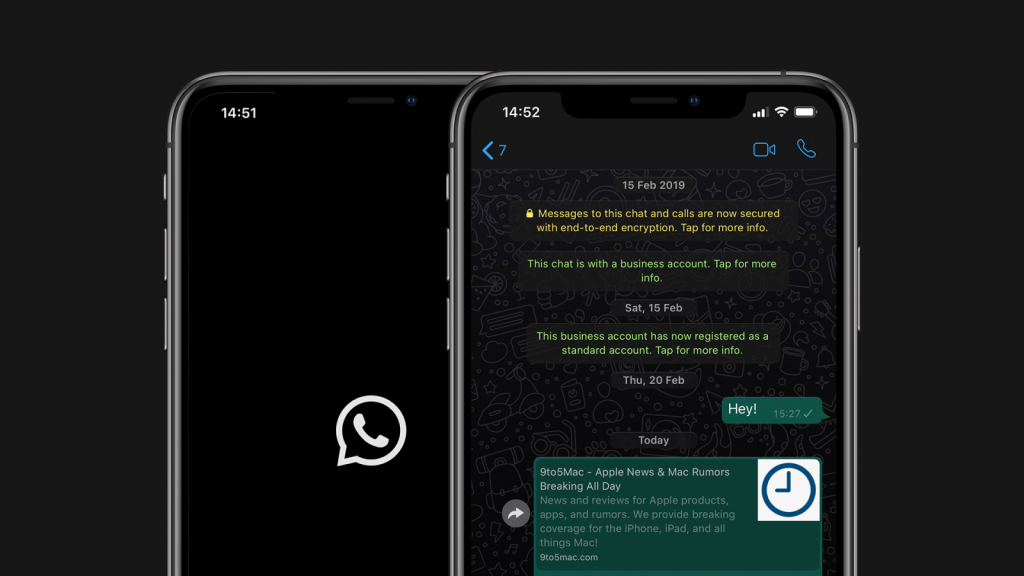
As of March 3rd, 2020 WhatsApp users globally started receiving updates on both the IOS and android devices. This feature lowers the brightness of the screen as well as improves contrast. It eases the stress of reading text on WhatsApp.
You must have the latest version of WhatsApp for iPhone or Android to enjoy the new feature. So far Android 10 and IOS 13 users can enjoy the complete feature.
How To Fix Battery Drain And Charge Your Phone Faster
How To Enable WhatsApp Dark Mode on IOS/Android
- open WhatsApp
- enter Settings
- Select Chats
- Choose Theme, then select Dark

It will automatically switch to the dark mode most of the people who had the dark mode loved it because of the green accents that are there throughout the interface – and the WhatsApp Web also supports the dark theme. it even works better if you set the entire phone to dark mode.
Let’s wait and see when other versions of android will receive the be sure to check this post for any information regarding the dark mode.