Are you having video lagging issues? Let’s solve it. Managing and working with media files can be a nightmare, as they are susceptible to corruption and becoming inaccessible. Multiple factors, such as system crashes, compression, transfers, and malware exposure, can damage files.
Among various media types, video files are particularly prone to accessibility issues due to their complexity. Fortunately, video repair tools like Wondershare Repairit offer a simple solution to repair corrupted video files with minimal effort.
Wondershare Repairit for Lagging or Corrupt Videos
Wondershare Repairit is a tool designed to help you fix corrupted video files. It comes in two versions: Repairit Desktop for computers, which requires a monthly or annual subscription, and Repairit Online, a web-based tool that’s completely free to use.
But before we delve into the tool, let’s first understand why video files often become corrupted. As mentioned, there are various reasons for this, but the most common culprits are issues with components like the index, header, metadata, frames, and more within the video file.
When these components get damaged, it can lead to problems such as flickering, video stuttering, blurriness, and audio syncing issues in your videos. In the worst-case scenario, your video file might become entirely inaccessible.
Repairit is a solution designed to address these issues and repair your corrupted video files without cost. It’s a convenient option for users looking to salvage their videos and eliminate these frustrating problems. It’s also a good video lag remover.
Repairit analyzes the specific components of corrupted files and assess the extent of the damage. Depending on the nature and severity of the issues, it attempts to rectify the underlying problems.
It offers a comprehensive solution that can tackle various video corruption issues especially when your videos are stuttering.
Whether your video suffers from problems related to the index, header, metadata, frames, or other aspects, Repairit aims to provide a solution, making it a versatile choice for addressing various video file problems.
What kinds of issues can Repairit – Video Repair resolve?
Repairit – Video Repair is a versatile and comprehensive tool renowned for effectively resolving a myriad of issues commonly encountered in video files like
lag in video.
Whether your video suffers from problems like ominous black screens, frustrating freezing, bothersome stuttering, an unwelcome blue tint, audio and video elements falling out of synchronization, or even complete sound absence, Repairit has you covered.
Moreover, this powerful tool extends its capabilities to tackle more complex issues related to video playback and the intricate components within video files. It proficiently addresses concerns involving metadata, ensuring that critical information about the video is correctly interpreted. It can also rectify problems within the header, ensuring the structural integrity of the video.
Repairit is adept at resolving issues with the video index, providing seamless navigation and playback. It can fine-tune parameters to optimize the video’s quality and performance. The tool is also skilled at addressing problems within individual frames, restoring them to their original state. Additionally, Repairit is equipped to deal with various error codes that may hinder your video’s functionality.
It is a comprehensive and adaptable solution that can effectively diagnose and remedy a wide spectrum of issues afflicting video files, making it an invaluable tool for those seeking to restore their corrupted or problematic videos to their full glory.
Wondershare Repairit – Video Repair Highlights
Although you already know what Repairit – Video Repair is and how it can help you repair your corrupted videos, here’s a quick rundown of all the highlights of this video repair tool to give you an overview of all its offerings.
- Repair damaged videos with all levels of corruption, such as video not playing, video no sound, out-of-sync video or audio, playback errors, header corruption, flickering video, missing video codec, etc.
- Repair videos of 18 different formats, including MOV, MP4, M2TS, MKV, MTS, 3GP, AVI, FLV, MXF, KLV, INSV, M4V, WMV, MPEG, ASF, etc.
- Repair damaged or corrupted videos caused by video compression, system crash, video format change, etc.
- No limit to the number and size of the repairable videos.
How do you Repair Video files using Repairit – Video Repair
Repairit offers a user-friendly web interface that makes the video repair process incredibly straightforward, requiring just three clicks. The developers have ensured a smooth and hassle-free uploading process, ensuring the repair operation runs seamlessly in the background without interruptions.
To effectively utilise Repairit for the repair of your corrupted videos, follow these straightforward steps:

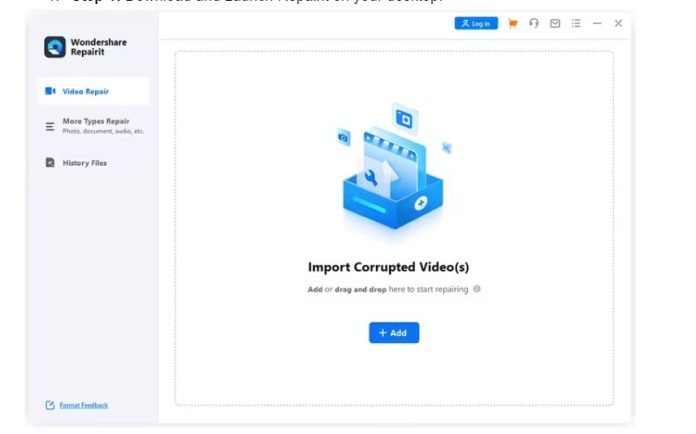
Step 2: On the Repairit’s interface, locate and click the central Add (+) button. This action will open a file navigator. Utilise this navigator to browse your computer and find the corrupted video file folder. Once found, proceed to upload the damaged video.
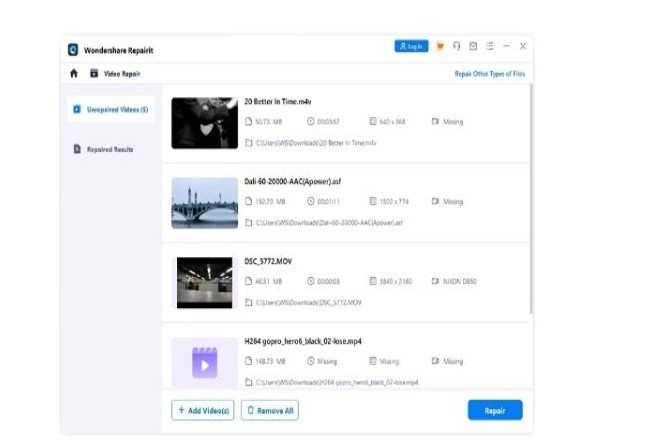
Step 3: After the upload, the tool will initiate the repair process in the background. This step ensures you don’t have to wait while the software works its magic

Step 4: Once the repair process is finished, you’ll be presented with two options. Firstly, you can choose to preview the repaired video file to ensure that it meets your expectations. Secondly, you can download the repaired video file to your computer for safekeeping and playback.
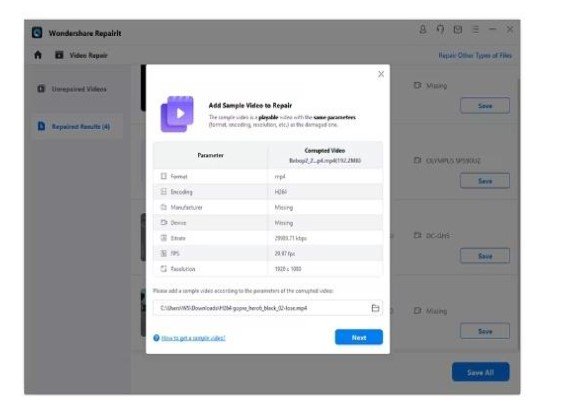
Having successfully saved the repaired video to your computer, you can now enjoy it using your preferred video player. This process simplifies repairing corrupted video files, allowing you to easily salvage and view your important media.
Conclusion
Wondershare, a renowned software company, offers various application tools to address device-related issues. Its popular utilities include Dr. Fone, UniSafe, Recoverit, and FamiSafe. In addition, Wondershare provides a web-based utility called Wondershare Repairit, which proves to be a valuable resource when you need to repair corrupted video files quickly and conveniently.
As you’ve already observed, Wondershare Repairit boasts a streamlined and hassle-free repair process. All you require is a few simple clicks to upload the problematic video file. From there, Wondershare Repairit takes charge, efficiently identifying and rectifying issues within the file, all while working discreetly in the background. You don’t need in-depth technical knowledge or expertise to use this tool effectively.
For those searching for a dependable solution to salvage their corrupted video files, Wondershare Repairit emerges as a compelling option. Its user-friendly interface and ability to swiftly and effectively repair video files make it a valuable tool for individuals encountering video-related problems. If you’re facing such issues, Repairit is worth exploring as a practical and accessible solution.