Are you looking for an automatic way to convert your images into text? If yes then this is the right guide for you.
Whether you are a student who wants to extract lecture notes from a PDF or a business person who is planning to get away from paper documents.
There is an automatic solution for everyone who wants to convert an image to text, technology has come a long way, and now we have online OCR tools to automate all the manual image-to-text conversion processes.
On the internet, you can find hundreds of OCR tools some are great, and others might not work that great so you should be careful to pick the best image-to-text converter but, how?
In this post, we will discuss the three best image-to-text converters that everyone can use in 2022 without worrying about the result accuracy. In one of our previous we even talked about apps to make the blurry pictures clearer.
So, stick to reading!
Top 3 Image-to-Text Converters in 2022
Image to text
The first OCR tool in our list is Imagetotext.info, this tool could be your best converter tool in 2022 as it is developed on Optical Character Recognition technology and integrated with AI to perform 100% accurate image-to-text extraction.
This tool works by first scanning the image user provided then it starts processing the image by smoothing its edges.
And in the last step, the tool extracts text by recognizing alphabets and letters and then uses a pattern-matching algorithm to match the recognized alphabets and images with its stored patterns.
If the image’s recognized text matches the tool’s stored patterns, this means that the tool is successful in extracting text from an image.
Example:
Original Image:
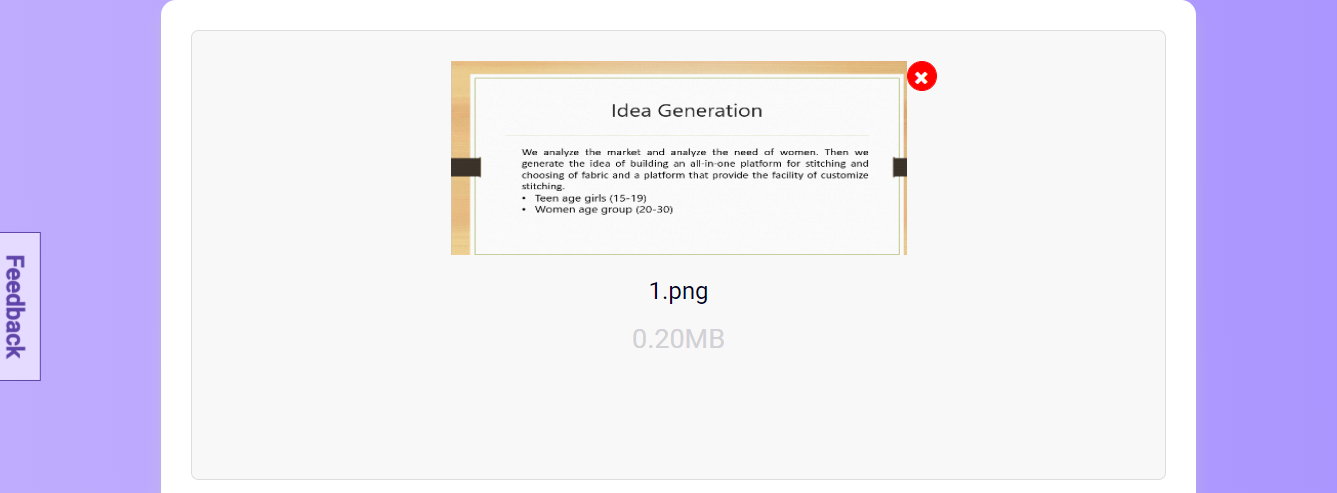
Extracted text via the tool:

Features:
Extract multi-lingual text from an image
This tool does not design to extract only English language text from images but, the AI behind the tool makes it possible for the tool to extract multi-lingual text from an image.
This means user can use this tool to extract text in more than 10 languages including French, German, and Swedish.
Ensure 100% accuracy of results
In the early period of OCR technology, it was faulty as the results it generates are not always accurate you can say mostly inaccurate and it just works for specific fonts maybe two or three.
But the improvement and advancement in OCR technology now have made this technology error-free therefore, this tool ensures 100% accuracy of results through its AI-based text extraction.
This tool even works with handwritten text, and the accuracy for extracting handwritten text from the image is without any doubt great.
Free for everyone
This tool is free for everyone, people can use the tool without any hidden cost and can use all its features at absolutely no cost.
Ocr2edit
Next, we have Ocr2edit.com, with this tool you can extract text from any image in more than 60 languages whether it’s a business document or a math quiz the tool can extract simple to complex math equations in just a few minutes.
You can use this tool by just drag/dropping the image or upload from your device, Dropbox, or Google Drive and hitting the ‘Start’ button.
This tool supports multiple image formats so you don’t have to restrict to only PNG or JPG image formats. This tool does offer a free version but the premium package is also available at $6.50, the premium package is best for file conversion, editing, and compression.
If you just want to do basic image-to-text extraction, the free version is best.
Here is a tip to use this OCR tool, if you want the tool to extract text without even a slight chance of error, make sure you select all the language your image contains.
Example:

Features:
Batch file processing
This tool has batch file processing capabilities to convert any image of any format into editable text really quick without any user intervention.
In this free version, users are not offered unlimited batch file processing conversion whereas, the premium subscription offers unlimited batch file processing.
Intelligent text extraction
Unlike other OCR image-to-text converters that do not work to extract handwritten text from an image, this tool has the ability to do intelligent text extraction, the tool uses a Machine Learning algorithm to extract handwritten and cursive text with complete accuracy.
Automatically download extracted text
Another great feature of this image-to-text converter is that it automatically downloads the text extracted from the image user inserted into the tool so that the user can use the extracted text whenever and wherever he wants.
Image to text converter
Last but not least, you can put a full stop to your search for the best image-to-text converter in 2022 as this tool is no less than great, it works even with low-resolution images that might actually be hard for a user to extract text manually.
This tool has a simple drag/drop method to import any image without any hassle.
Also, users can insert the image link in the URL box if the image is not in the device, the tool can access any image from anywhere with the given URL.
This tool allows users to insert a maximum of 3 images at a time in a free version however, the premium package extends the limit to 30 images at a time.
Example:
3 images at a time:

In this example, we have inserted three images at a time, and the tool extracts from all three images with complete accuracy.
Features:
Safe to use
This OCR tool is completely safe for everyone as it does not require the need for registration to use and the tool does not store any image or text in its database.
So, users can use this tool without worrying about the data in their important and official documents.
No installation
Users can use this tool online with just a good internet connection on their device. They don’t have to first install or configure the tool.
Extract text from low-quality images
This tool is capable to extract 100% accurate text from low-quality images which makes this tool best for students as they have images of notes and assignments in low quality and it is hard for them to understand each word in the image and write it manually.
Bottom Line
Selecting the best image-to-text converter from hundreds of online OCR image-to-text converters is a challenging task for most of us, therefore, we have listed the top 3 images to text converters above that anyone can use without any confusion in 2022.
Extracting from images can never be this simple, we have tested and tried all three tools listed above, so go try them to pick your best OCR tool for image-to-text extraction.