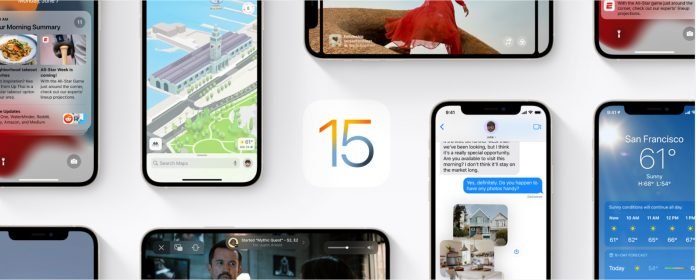
Do you want to see if your iPhone is compatible with the latest IOS 15? Check the list below to find out if your device is compatible. We are also going to talk about the top best IOS 15 features.
I am sure that by the time you are reading this the iPhone 13 series would be available globally but that’s not the focus here today. We are going to take a look at all the iPhones that will support IOS 15. The list is long and that’s one of the things I respect Apple for five years of software support for their phones.
Coming alongside the iPhone 13 Pro Max will be the most complete version of the IOS 15 – Other iPhone 13 series included. It was unveiled earlier at the worldwide developer conference back in June and it has been available for BETA testing. One of the major highlights of the IOS 15 is the ability to start facetime videos with Android users.
There is going to be a new AR-based street direction on the Maps, focus mode will also be available and it lets you concentrate on work or exercise by muting notifications, there are newly added privacy features, Spatial Audio on facetime calls, and lots more. You can check out the updated prices of all iPhones
The official release date of the IOS 15 is going to be September 14th same that Apple will release the iPhone 13 series. Without further ado, let’s take a look at all the iPhones that will support the IOS 15.
IOS 15 Announcement/Launch
As we know the IOS 15 was officially announced in June 2021 at the worldwide developer’s conference (WWDC). The event is hosted annually by Apple and they share the next iteration of their new updated operating system the IOS. At this year’s event, Apple announced several new features but we are going to share the top 10 most exciting features with you here.
Some of the features were improved versions of existing features while we got some brand-new exciting features as well. The IOS is centered on user privacy and protection and that is one of the biggest reasons why some users prefer it over Android. We have some new exciting features for facetime that let your even facetime people with Android phones exciting times I tell you.
The map has a new 3D feature in some cities with a huge improvement in details. You get voice isolation and spatial audio while using facetime and other improvements we will share in a bit. Well out of all the excitements Siri remains Siri if you know what I mean. Let’s dive into the top best features of the IOS 15 the ones that really matter.
The 10 best iOS 15 Features – The New Improvements
Facetime
Starting at the top has to be facetime because it has some newly redesigned features that are exciting. One of the major reasons for having a revamp with facetime is the pandemic. Part of what kept us together was video calls with our loved ones. Apple has made significant improvements with facetime adding some important new features coming along through iOS 15 features.
Facetime now offers Spatial audio and now voices would sound as if they are coming from where the person is located on the screen. There is also a new feature that will separate a user’s voice from the background noise. facetime now has portrait mode for videos to keep the user focused on the person he’s having a call with.
We also have a new grid view for group calls that enable participants to see more faces at the same time. The mute alert is also clearer when you are speaking on mute.
Focus
This is a new iOS 15 feature that lets users reduce distraction and it’s called the focus. It can filter notifications and home screen pages based on what a user wants at a particular time. A user can still decide to allow urgent notifications through. One of the most exciting things about this new feature is that when a user blocks incoming notifications, their status is automatically displayed to other people in messages, showing that a user is not available currently unless it’s urgent.
IOS will suggest what a user should focus on using device intelligence to determine which app and people should notify them at a time. Focus suggestions are based on a user’s context such as work hours, personal time, or winding down for bed. Users can also create a custom focus mode to only show certain notifications and custom screen pages. Focus can also be synced across Apple devices.
SharePlay
Another new feature that allows users to share experiences during facetime calls, including media like TV shows, Apple Music songs, or even movies. Media will be played in sync for all the participants and there is a shared playback control any user that is in the facetime call can pause a movie and get more popcorn.
You can also share your Apple device screen during a facetime call. Third-party apps like HBO Max, Tik Tok, Twitch, Hulu, and Disney+ have signified their interest in integrating shareplay. SharePlay also extends to all other Apple devices including Apple TV.
Notes
I have lots of colleagues that take notes with their iPhones and the IOS 15 brings some new features here. You can now create notes and categorize them in a new way using tags. There is a new custom folder that automatically collects notes based on tags. We have a tag browser to tap combinations of tags and quickly view tagged notes.
You can also mention other users in shared notes to notify them of updates and new activity history in their recent edits.
Facetime Links
Who will know that a time will come when users can be able to share facetime links to Android and Windows users. Users can now create a link to a facetime call and share them through messages, calendar, mail, or any third-party app.
The links can be opened using a browser, bringing facetime to android and Windows for the first time. Facetime is still end-to-end encrypted to guarantee privacy.
Notification redesign
The IOS 15 introduces a new revamped notifications shade feature. Notification will now display contact photos for people and larger icons for apps to make them easier to identify. Users will get a new personalized notification summary that collects non-urgent notifications together to be delivered at a more appropriate time. All notifications will be arranged following priority using device intelligence to analyze user interaction with his iPhone.
The most important messages will be displayed at the top urgent messages and sensitive messages will be delivered on time. You can now mute any app or messaging threads notifications temporarily, IOS 15 will suggest muting a thread.
Maps
Maps now come with a new globe view that will give users more details in 3D views for cities. Buildings will now be displayed in detail alongside new road colors and labels, night mode is known as “moonlit” now works in maps to make the experience better at night.
Users will also get a 3D city driving experience with road details such as turn lanes, medians, bike lanes, and pedestrian crosswalks, that will work on the iPhone and Apple car play. The map has been completely given a facelift. Search results will now have new options to filter results by criteria like cuisine or opening times.
Spotlight
You can now use intelligence to search for photos by location, scenes, people, or objects using the new live text feature powered by spotlight. Spotlight can find text and handwriting in photos.
Spotlight also supports web image searches and it will give users better results for actors, tv shows, and movies. There will be better results for contact cards show recent conversations, shared photos, location if it is shared through find my. You can also have access to the spotlight from the lock screen and quickly install apps from the app store without leaving the spotlight.
Safari
Safari also has some new additional features, controls are now easier to reach because they are now at the bottom of the screen very easy to reach with one hand. We have a compact tab bar that floats at the bottom of the display so users can easily swipe between tabs, it also has what is called a smart search field. You can now save your tab in a folder and sync across all apple gadgets.
Safari now has support for voice search and users can pull down a webpage to refresh it. For the first time, Safari also has a customizable start page and mobile web extensions. Safari has new privacy protections, that includes intelligent tracking prevention this prevents trackers from profiling you using your IP address, safari will automatically upgrade sites known to support HTTPS for insecure HTTP
Messages
Contents sent to you in messages automatically appear in a new “shared with you” section in the corresponding app. Shared with you is featured in Safari, Photos, Apple News, Apple Music, Apple Podcast, and Apple TV app. You can pin relevant content shared with you and it will stay at the top in Shared with you.
Messages also get new regional improvements in IOS 15, such as un-wanted SMS filtering in Brazil and notification option in India and China, allowing users to turn off notifications for the type of messages they don’t want.
All The iPhones that will Support IOS 15
The Following are the iPhones that will Support the iOS 15 Operating System:
- iPhone 13 Pro Max
- iPhone 13 Pro
- iPhone 13
- iPhone 13 Mini
- iPhone 12 Pro Max
- iPhone 12 Pro
- iPhone 12
- iPhone 12 Mini
- iPhone SE 2020
- iPhone 11 Pro Max
- iPhone 11 Pro
- iPhone 11
- iPhone XS Max
- iPhone XS
- iPhone XR
- iPhone X
- iPhone 8 Plus
- iPhone 8
- iPhone 7 Plus
- iPhone 7
- iPhone 6s Plus
- iPhone 6s
- iPhone SE first Gen
Apple is the only brand that pushes software support to iPhones that are six years old. No other smartphone brand can be able to boost that. Listed above are all the Apple iPhones that would receive the brand new IOS update that would come along with the new iPhone 13s. The iOS 15 is an extensive improvement on previous iOS software far as back as the iOS 13 aswell.