There are hundreds of USB Flash Drives available in the market that promise you the safety of your data. But no matter which USB Flash drive you have, you are going to face the problem of data loss one way or another. It is common to lose data from USB Flash drives due to device corruption, accidental deletion, virus attack, device formatting, etc. In this article, we are going to show you several methods to recover permanently deleted photos from your USB Flash Drive. It is going to be a very informative article, so keep reading it till the end.
Part 1: The Simplest Method to Recover Deleted Photos from USB Flash Drive
One of the best and most effective ways to get back deleted pictures from USB is with the help of a professional data recovery software, like Wondershare Recoverit. The best thing about Recoverit is that it recovers your lost photos with a few simple steps. You don’t have to be an expert in IT for that anymore.
To get started with restoring deleted photos from USB drives, follow these steps:
Step 1: Install and Launch Wondershare Recoverit
Download and install Recoverit Photo Recovery on your PC or Mac, if you don’t have it. Once it is successfully installed on your PC, launch it.

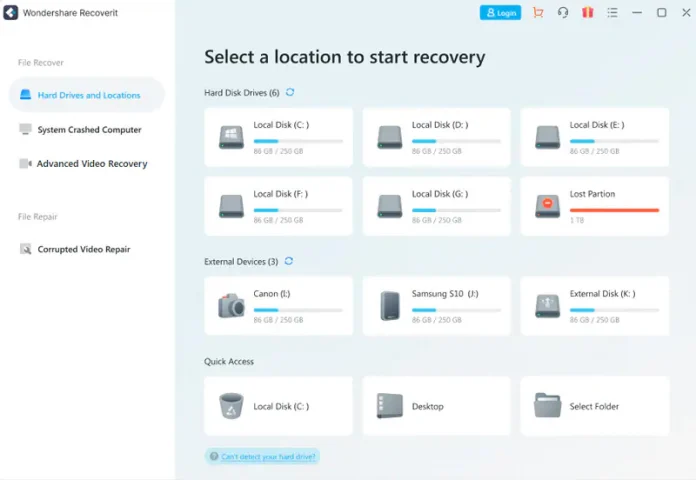
Step 2: Connect USB Flash Drive to Your Computer
Then connect USB Flash Drive to your computer. Once it is visible on the screen of Wondershare Recoverit, select it. It will start to scan all the deleted data on your USB Flash Drive.
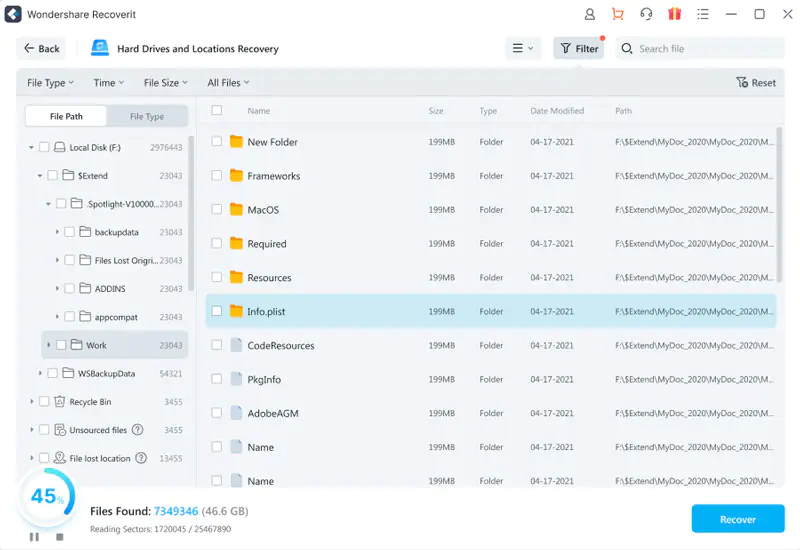
Step 3: Preview and Recover Deleted Images
Once the scan is complete, preview the scanned photos and choose all the images you want to recover. Once you have found all the pictures you want, click on Recover to start recovering your photos from USB Flash Drive.

After you have restored all your photos from USB, make sure to save them on a safe drive. Keeping those pictures on the same USB Flash Drive is not recommended.
Why Choose Wondershare Recoverit?
You might be wondering why Recoverit Photo Recovery is recommended when other data recovery tools are available in the market. As one of the best image recovery tools, Recoverit enjoys a 95% successful recovery rate and its easy-to-use & user-friendly interface allows any users to recover lost. And you don’t need any expertise or experience in this technology. Moreover, the features included in this software make it unique and different from all other tools. Although there are countless features in Recoverit, the following are some of the most prominent features:
Supports Recovering 1000+ File Formats
While recovering the data using any recovery tool other than Recoverit, most people face the problem of unsupported formats. With Wondershare Recoverit on your back, you don’t have to worry about the type of file you want to recover, as it allows you to recover almost anything, whether a video, image, document, audio or anything of any nature.
Recovery in all Situations
Whether the photos from your device have been deleted by mistake, due to a virus, system crash, formatting, corruption of the device, or any other reason, Recoverit has got you covered. Data deletion of more than 500 different scenarios can be recovered with the help of Recoverit.
Compatible with 2000+ Devices
With Recoverit, there is no limitation on devices that you can restore data from. Whether it’s a Drone, DSLR, USB Flash Drive, SSD, External Hard Disk, Dashcam, Floppy Disk, or any other device, you don’t have to look anywhere else. It means Wondershare Recoverit is a complete package for all your devices and all types of files.
Part 2: Recover Deleted Photos without Software
If, for any reason, you are not comfortable with using a data recovery tool like Wondershare Recoverit to recover deleted photos, then there are still some other ways that can be used to restore photos from USB Flash Drive. Following are two ways to help you know how to get back deleted pictures from USB Flash Drive without software.
Method 1: Retrieve Photos from Windows Backup
This method uses the default settings of Windows to back up your photos. It doesn’t require any additional information or permission. If the backup of your windows system is on, all of your deleted data can be safe. To check the backup files on your computer, follow these steps:
Step 1: Go to System and Security
Go to System and Security after navigating to the Control Panel. Here you will find an option named “Backup and Restore.” Click on it.
Step 2: Restore Files
Once under the section “Backup and Restore,” you can restore the files by clicking on Restore My Files. Now browse the file that you are looking for.
Step 3: Choose a Location to Save
Now to save your restored files, select a location. The files will be saved in that new location.
Method 2: Using CMD to Retrieve Photos
This is another helpful method that can be used to recover deleted photos from USB. To get started, connect your USB to your PC and follow these steps:
Step 1: Open Command Prompt Window
To open the Command Prompt Window on your PC, Press “Windows + R.” It will open the Run window. Now type “cmd” and hit enter.
Step 2: Type chkdsk H: /f
Once in the Command Prompt Window, type chkdsk H: /f and hit enter. Change H with the letter of your USB’s Drive letter, if it is different. Now type Y and hit enter. Again type the drive letter of the USB and hit enter.
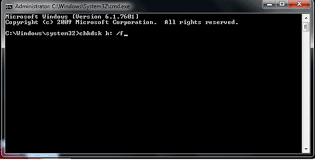
Now type D:\>attrib –h –r –s /s /d *.* and hit enter. Change D with the USB’s drive letter if it is other than D.
Now, wait for some time until the process is completed.
Part 3: Conclusion
In this age of technology and advancement, restoring deleted photos is not a big problem anymore. The above-mentioned methods on how to get deleted pictures back from USB Flash Drive can help you throughout the process of recovery. We hope it will solve your problem and help you retrieve all your important images back.