Being billed for a Subscription is something we usually are not happy about, especially if you’ve planned for the money they billed from. If you are someone who likes to access content from an app and service on your Apple iPhone, you might want to cancel your subscription one day.
Now, with a couple of clicks, to change or cancel iPhone subscriptions can be very easy. With these easy directions or steps, you just click away from canceling iPhone, iMac, or apple smartwatches subscriptions on any device.
Recommended – Apple iPhone SE 2020 – Full Phone Specifications & Price in Nigeria
How To Change Or Cancel Subscriptions on Apple iPhones, iMac & Smartwatch
How To Cancel Subscriptions on iPhones
- Navigate to ‘Settings’ on your iPhone, click on the name ( the name you used for your Apple ID ).
- Choose ‘Subscriptions’, here you can see various active subscription. Navigate till you’ve found the subscription you wish to cancel or change. Tap on the desired subscription to manage it.
- It shows you different subscription options to choose from or simply select ‘Cancel Subscription’ to terminate.
- Perhaps, you can’t see ‘Cancel Subscription’, it might already be canceled or won’t renew.
In any case, you have been unable to locate the subscription you want to manage, just relax. The subscription might be billed through another company? Or a different Apple ID link with your card.
See How To Cancel Subscriptions on Your Mac
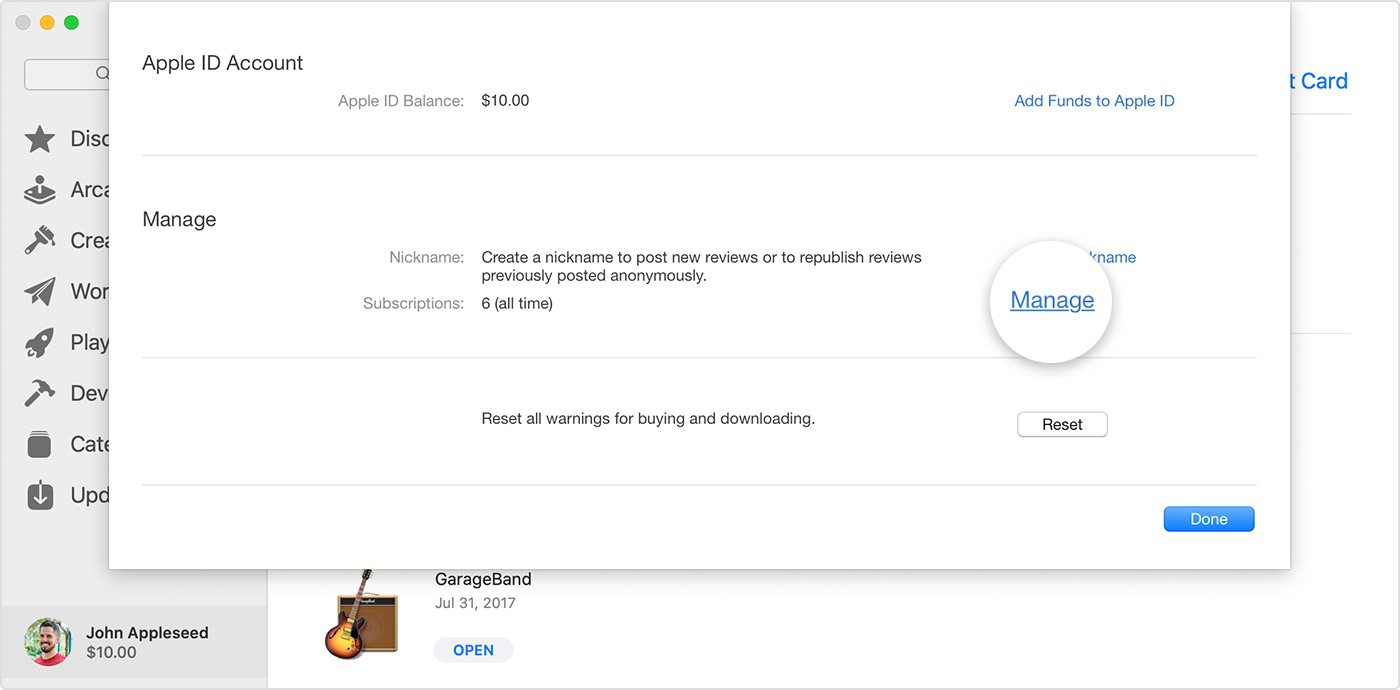
- Open the App Store app.
- Click the sign-in button or your name at the bottom of the sidebar
- Click View Information at the top of the window. You might be asked to sign in.
- On the page that appears, scroll until you see Subscriptions, then click Manage.
- Click Edit next to the subscription that you want.
- Click Cancel Subscription. If you don’t see Cancel Subscription, then the subscription is already canceled and won’t renew.
In any case, you have been unable to locate the subscription you want to manage, just relax. The subscription might be billed through another company? Or a different Apple ID link with your card.
How to Cancel Subscription on Apple Smartwatch
- On your Apple Watch, open the App Store
- Scroll to Account and tap it.
- Tap Subscriptions.
- Tap the subscription that you want
- Tap Cancel Subscription.
In any case, you have been unable to locate the subscription you want to manage, just relax. The subscription might be billed through another company? Or a different Apple ID link with your card.
RECOMMENDED – Apple Watch Series 5 – Full Specifications & Price in Nigeria
What Apple ID did I use?
This is when you have to ask yourself a bit of question, which Apple ID did I use, or did a friend or loved one sign up for the subscription you want to terminate?
Ask the friend or loved one to change or cancel the subscriptions from their own devices immediately they signed in with their Apple ID.
In any case, you used a different Apple ID, simply sign in using the account and follow the instruction we listed above.